


Philo: Shows, Movies, Live TV.
4.46.38K Reviews
App Specs
- Version
- Varies with Device
- Updated On
- License
- Free
- Downloads
- 5,000,000+
- Developer
- Philo, Inc.
- Categories
- Entertainment
- Platform
- Android, iOS
Screenshots

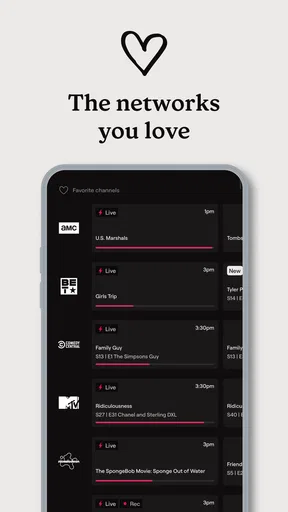
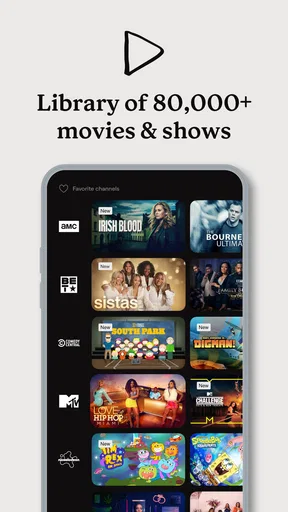
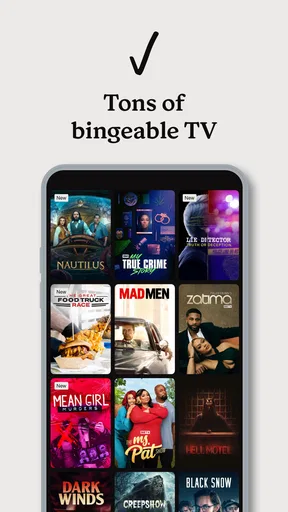
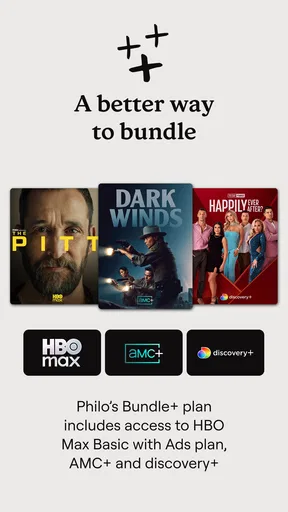
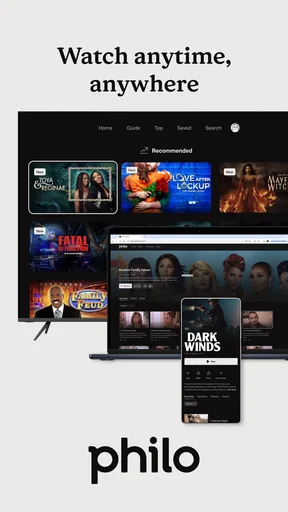

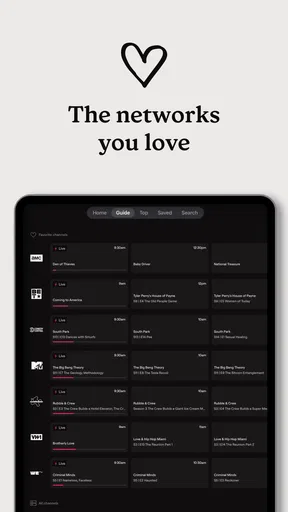
 Analysis by AppCompare
When several people share a TV, choosing what to watch can take longer than watching the show itself. I find Philo: Shows, Movies, Live TV most appealing for households that want live channels alongside shows they can catch up on later, without making the living room feel like a cable box menu. It can work well for different tastes under one roof, though it is worth thinking through who will use the account and what everyone expects to find before treating it as the household’s only TV service.
A shared screen with different viewing habits
A typical evening might mean one person wants a familiar series while someone else is looking for a live program. Philo’s mix of live TV and on-demand viewing gives a household more than one way to settle that choice: watch what is on now, or look for a show at a more convenient time. I would consider it for roommates or couples whose interests overlap around entertainment channels, and for a home where people take turns using the same television rather than needing separate viewing setups.
The useful question is not simply whether there is plenty to browse; it is whether the channels and programs match the people who will actually use it. A broad entertainment selection is valuable when everyone can name something they would watch. If one person mainly wants live sports, local coverage, or a particular channel that is not part of the service they are considering, the overall variety may not solve that mismatch. I would check the current channel and program availability against the household’s regular viewing habits before switching away from another service.
Set expectations before everyone starts watching
It helps to agree on the basics early: who is signing in, which device is the usual shared screen, and whether people plan to watch live or save programs for later. That is ordinary household coordination, not a substitute for account-management tools. I would not assume a shared subscription automatically creates separate viewing spaces or makes every person’s choices private. If that distinction matters, check how the current app and account handle it before relying on the service for a group.
There is also a practical difference between sharing a television and sharing a login across personal devices. A family may be comfortable choosing programs together on one screen but prefer clearer boundaries when each person watches separately. Rather than assuming the app has controls for every household arrangement, decide what level of sharing feels right and review the account terms before inviting others to use it. That small conversation can prevent a later argument over access, recommendations, or who changed what.
Teen rating and household judgment
Philo carries a Teen age rating, which is useful context for parents, but I would treat it as a starting point rather than a promise that every program suits every teenager. A channel-based service can bring together many kinds of shows, and individual families draw different lines. If a teen will use the app, I would talk through what is appropriate at home and make choices together instead of assuming the rating settles the question.
For adults sharing a home with younger viewers, the simplest safeguard is often a clear routine: decide whether the app is for shared family viewing or mainly for adults, and keep the remote and account access consistent with that choice. I would not count on a particular parental-control feature unless it is visible in the current version and confirmed in the account settings. The point is to make an informed choice about content and access, not to mistake an age label for supervision.
Worth Reading Before You Choose

EA SPORTS FC Mobile 26 Is a Bigger Football Game, but It Takes Time

Flipboard Shows What News Apps Must Do Beyond the Feed

Switching to Android Auto Means Rethinking Your Driving Routine

Google Calendar Makes a Crowded Week Easier to Manage

Ludo King Makes the Most of the Minutes Between Plans

Baby Panda World Brings Quick Play to Modern Phones, but Its Game Library Feels Busy
Getting Started with Philo
First things first, setting up Philo was a breeze. I downloaded it from the app store, signed up, and in no time, I was browsing through a pretty impressive selection of channels. The app is available on both Android and iOS, and it’s designed to be super user-friendly, which I appreciate because who has time to deal with complicated interfaces?
Once you’re in, you’ll notice the app’s clean layout. Everything is organized into neat categories, making it easy to find what you’re in the mood for. Whether you want live TV, movies, or specific shows, Philo has you covered. And the best part? There are no annoying ads to interrupt your viewing experience!
The Content Line-Up
Now, let’s talk about the content. Philo boasts over 60 channels, which is quite a steal for its price point. You’ve got all the popular ones like AMC, Comedy Central, and HGTV, just to name a few. If you’re a fan of reality TV or love a good drama series, you’ll definitely find something to keep you entertained. I found myself glued to the screen more times than I’d like to admit, thanks to the diverse offerings.
Another cool feature is that Philo offers unlimited DVR. Yes, you heard that right! You can save all your favorite shows and watch them at your convenience. I personally love this because I’m always missing episodes, and now I don’t have to worry about it.
Performance and User Experience
In terms of performance, the app runs smoothly, and I didn’t encounter any buffering issues, which is a huge win in my book. The video quality is top-notch, whether you’re watching on your phone or casting to your TV. The navigation is seamless, and I didn’t experience any lags switching between channels or shows.
One thing that sets Philo apart is its social media integration. You can connect with friends and see what they’re watching, which adds a fun, interactive element to the app. It’s like having a virtual movie night with your buddies, even if you’re miles apart.
How I’d fit it into a TV routine
The DVR is most useful when I treat it as a planned catch-up queue, not an excuse to save every interesting title. If a household member spots a program while browsing, saving it can make it easier to watch later without asking everyone to change the channel right away. For a busy week, that turns a live schedule into something more flexible. I would still make sure the people sharing the screen know what has been saved and when they want to watch it, especially if evenings are already a negotiation.
For a quick decision, I would compare Philo with the two common alternatives: a traditional cable package and a collection of separate on-demand apps. Cable may make more sense for someone who depends on a particular channel lineup or wants one familiar TV bundle. Separate streaming services can be better when a household mostly watches specific libraries and rarely tunes in live. Philo sits between those patterns: it is aimed at people who still value channels, but want the convenience of streaming and saved viewing rather than a conventional cable setup.
The trade-off is that one subscription does not automatically replace every service a household uses. The app’s current summary includes access options involving AMC+, discovery+ and HBO Max, but I would check the account screen carefully to understand what is included in the plan and what may involve an additional charge. That matters when comparing the real monthly household budget: a service can feel inexpensive on its own, yet become less compelling if everyone expects several extras as well.
Who should consider it—and who may not
I would recommend looking at Philo if your household enjoys entertainment-focused live channels, watches a mix of scheduled and on-demand programs, and wants one place to browse rather than switching among several apps every night. The developer is Philo, Inc., and the app is free to install, while use of the service involves subscription choices and in-app purchases. Its average rating is 4.4 from around 33,000 ratings, and it has passed 5 million installs, which suggests it has reached a sizable audience without telling you whether its lineup fits your own home.
I would be more cautious if live sports, local news, or a particular network is the main reason you pay for TV. Those needs are specific enough that a general entertainment lineup may leave a noticeable gap. It is also not the obvious choice for someone who only watches a few on-demand shows and has no interest in live channels; a focused streaming app may be simpler for that viewer. Before subscribing, I would write down the channels and programs each household member actually watches, then compare that list with what is available in the app.
On Android, the app lists Android 7.0 as its minimum operating-system requirement, and the current version is 9.20.0-934307-google. It is rated Teen, so parents should make their own call about suitability for younger viewers. The service is free to download, but in-app purchases are listed from $29 to $38 per item; I would review the displayed plan and purchase details before confirming anything, rather than assuming the download price represents the full cost of watching.
Is Philo Worth It?
So, is Philo worth downloading? If you’re looking for a budget-friendly streaming service that offers a wide variety of channels and on-demand content without the fuss of contracts or hidden fees, then absolutely. It’s perfect for cord-cutters who want to enjoy live TV and their favorite shows without the hefty cable bill. Plus, with a free trial available, you can test the waters before committing.
Overall, I’ve been really impressed with Philo. It’s straightforward, affordable, and delivers exactly what it promises. If you’re someone who values simplicity and variety, give Philo a shot. You might just find it becomes your go-to app for all things TV.
My household verdict
For a shared home, I see Philo as a good fit when the main goal is making entertainment viewing easier to coordinate, not solving every TV need for every person. It works best when people agree on the kind of channels they want, understand how the subscription and any add-ons affect the bill, and are comfortable sharing access in the way the account allows. I would not choose it solely because the app is easy to browse; the lineup has to earn its place in your routine.
My practical recommendation is to start by checking the shows and channels your household would miss if they disappeared, then compare those with the current offering and the total cost you expect to pay. If that list matches, the combination of live viewing and saved programs can make everyday TV less rigid. If it does not, a more specialized service—or keeping the service you already rely on—may be the better call. That is the difference between an appealing app and one that genuinely suits a household.
Pros
- Affordable subscription price.
- User-friendly interface.
- No contracts or hidden fees.
- Unlimited DVR storage.
- Wide selection of channels.
Cons
- Limited sports channels.
- No local broadcast stations.
- Ads in on-demand content.
- Requires internet connection.
- No 4K streaming support.
FAQs for Philo: Shows, Movies, Live TV.
What is Philo and how does it work?
Philo is a streaming service that offers access to a wide range of live TV channels, shows, and movies. Unlike traditional cable, Philo streams content directly to your device via the internet. It focuses on entertainment and lifestyle channels, providing a cost-effective alternative to cable subscriptions without the need for specialized equipment.
How much does a Philo subscription cost and are there any hidden fees?
Philo offers a straightforward pricing plan, with a monthly subscription fee that is usually more affordable than many other streaming services. There are typically no hidden fees, making it a transparent choice for budget-conscious viewers. Always check their website for the latest pricing and any promotional offers.
On what devices can I use Philo?
Philo is compatible with a wide range of devices, including smartphones, tablets, smart TVs, and web browsers. It supports iOS and Android platforms, as well as devices like Roku, Fire TV, and Apple TV. This flexibility allows you to enjoy your favorite shows and movies on the device of your choice, wherever you are.
Does Philo offer a free trial for new users?
Yes, Philo typically offers a free trial period for new users, allowing them to explore the service without any initial commitment. This trial period can vary, so it’s advisable to check their website for the most current offer. It’s a great way to experience Philo’s offerings before subscribing fully.
What type of content is available on Philo?
Philo provides a variety of entertainment and lifestyle channels, focusing on content such as reality TV, drama series, documentaries, and movies. However, it does not include sports or news channels, which aligns with its goal of delivering entertainment-focused programming. This makes it ideal for viewers primarily interested in non-sporting content.


